Revit to Website
Claude reads the Revit model you have open and builds a project website from it: the numbers, the rooms, the wall build-ups and the views. You send it as a link. All from the Claude desktop app.
Shown on the Pacific Continental Residence in Revit 2027
Revit × Claude is out: 44 Revit skills, three free to try. See the skills →
1. Connect Revit
The prompt runs through the Revit MCP server, a free add-in that lets Claude read the model you have open and make changes in it. Set it up once and it loads with Revit after that.
▸How to set up the Revit MCPopen
The full setup, with a video, is at archaiflow.com/setup.
step 1Install pyRevit
Install the latest pyRevit from pyrevitlabs.io.
step 2Add the extension, in Revit
It is in pyRevit’s own extension list, so there is nothing to download by hand.
- 1.Revit → pyRevit tab →
Extensions. Findrevit-mcp-pythonand install it. - 2.Same tab →
Settings→ Routes: turn the Routes Server on. - 3.Restart Revit and open a project.
step 3Install the Revit MCP
Paste this prompt to install the Revit MCP.
Connect the Revit MCP server to Claude Desktop on Windows.
The pyRevit extension is already installed at
%APPDATA%\pyRevit\Extensions\revit-mcp-python.extension

1. Install uv if it isn't already on PATH.
2. Add a "Revit Connector" entry to the mcpServers block of my
   claude_desktop_config.json that runs the main.py in that
   folder with uv. The repo README's "Connecting to Claude
   Desktop" section has the exact JSON shape:
   https://github.com/revit-mcp/revit-mcp-python
3. Tell me when it's done, and remind me to quit Claude Desktop
   completely and reopen it.
Quitting Claude Desktop completely and reopening it puts Revit Connector in the connectors list under the message box.
2. One prompt
Open the model in Revit, then paste this into a new chat.
Use the Revit model I have open.

1. Read the project: Project Information, the levels and their
   heights, the rooms on each level with their areas, and the
   wall, floor and roof types with their layers.
2. Find the 3D and camera views worth showing. Open each one
   and tile them so I can watch, then export each as a PNG to
   a folder in Documents. If there is no exterior perspective,
   make one and tell me.
3. Suggest a few ways the website could look: style, colours
   and which sections. Ask me which one.
4. Build the one I pick as a single web page, with those
   pictures and the numbers read from the model, never with
   generated images or made-up text. Leave out anything the
   model doesn't have, including placeholder text like
   "Enter address here".
5. Make it an artifact I can share with a link or download,
   then go through it with me and tell me what to check
   first: anything the model was missing.

Never save the Revit model. When I say I'm done, delete the
views you made.
Claude stops once, at step 3, so you can pick how the page looks. The rest runs on its own.
The model is never saved. Any view Claude makes for a picture stays until you say you are done, and then Claude deletes it.
3. What comes back
One web page that reads on a phone, built from the views Claude exported and the numbers in the model. See the example here.
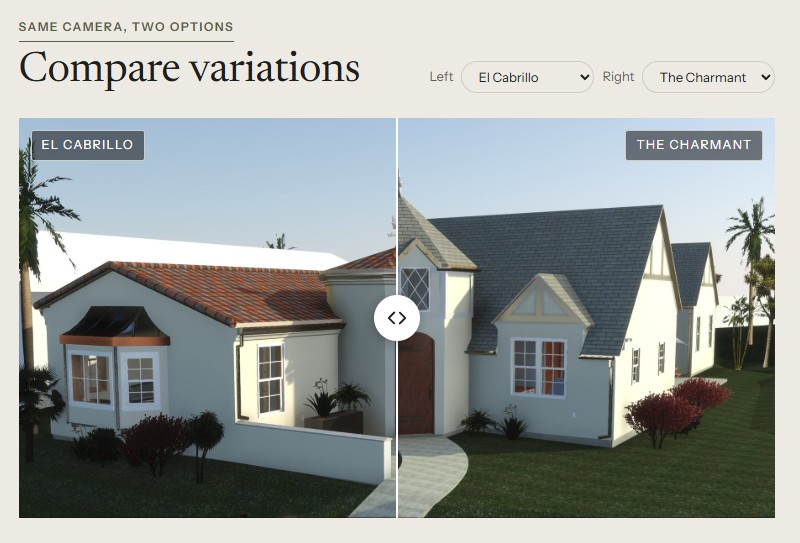
When the model has design options, each one is seen from the same camera, on one slider.
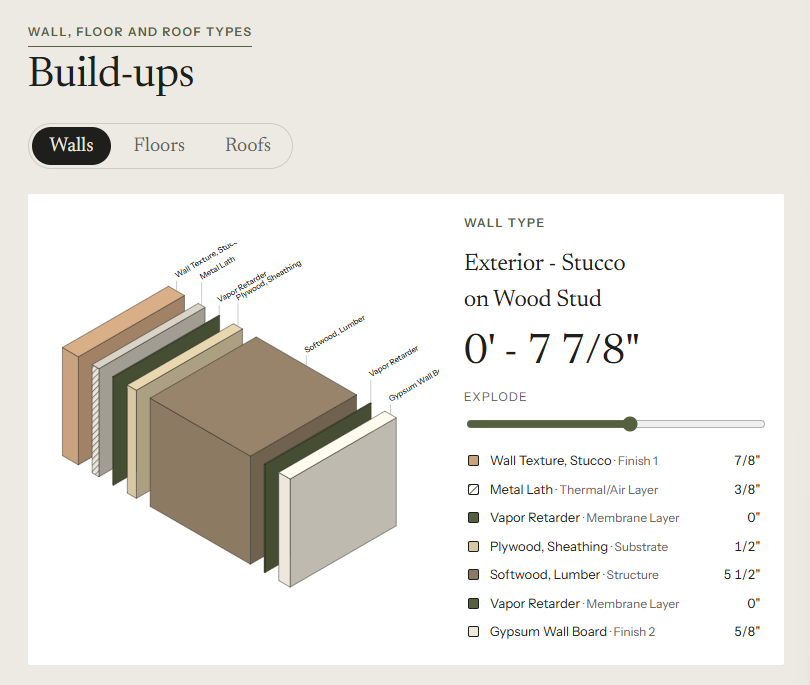
Each wall, floor and roof type is pulled apart layer by layer, with the thickness of each layer.
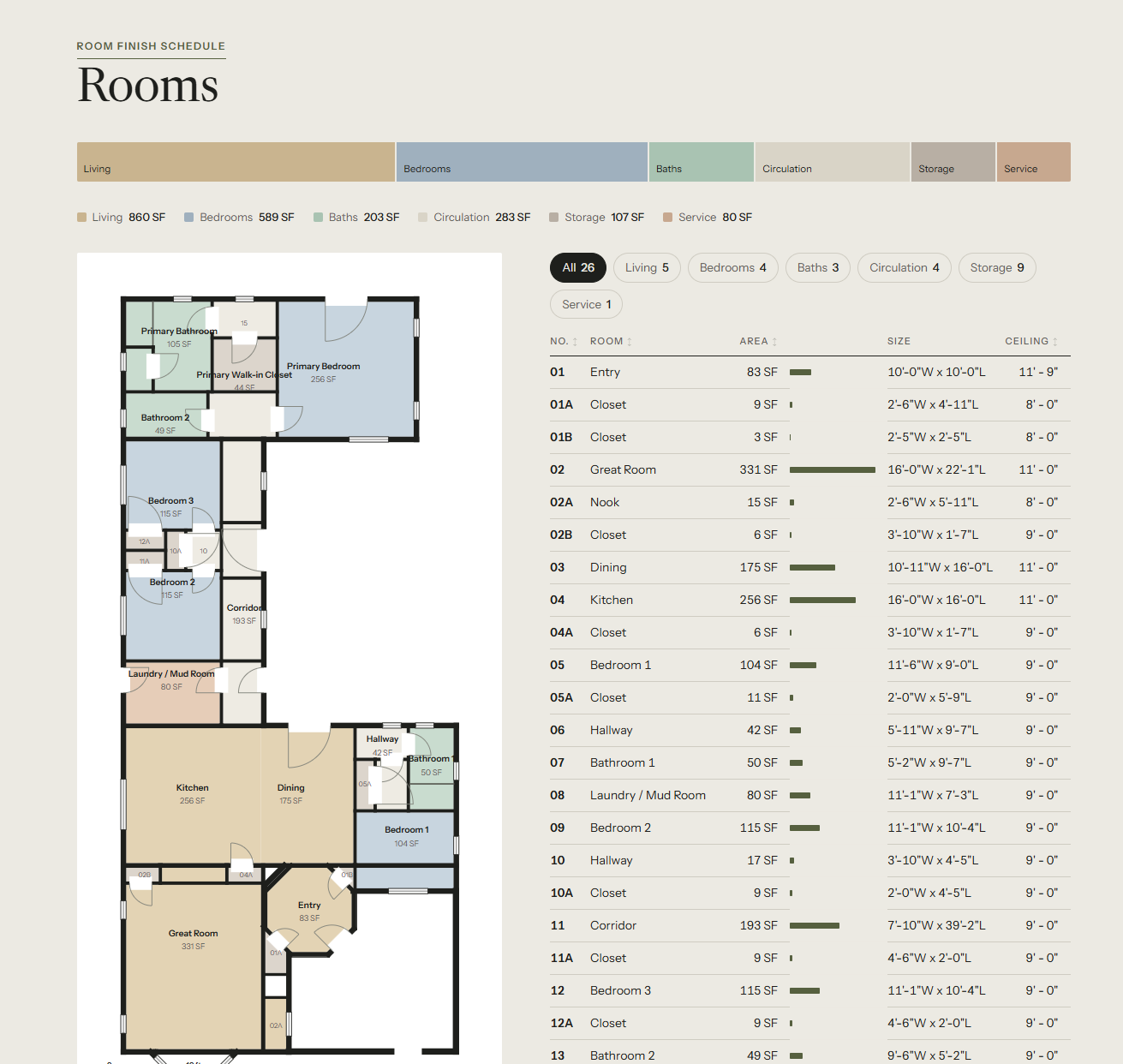
Every room on the plan carries its name and area from the model. Hover or tap a room to find it in the table next to it.
The example also has renders made earlier from the same Revit cameras. The prompt on its own uses the pictures Revit exports.
4. Why from the model
Claude reads every number from the model instead of writing it, so the page says what the model says. Anything the model does not have stays off the page.
When Claude goes through the page with you, it names those gaps first, so you can fill them in Revit.
5. Sending it
The page comes back as an artifact. Share it as a link from its Share menu, or download it. Anyone with the link can open it, so check with the client first when the house is not built yet or the page shows an address.
I hope this one helped, even a little. If it did, the skills and the handbook will help a lot more: the Revit jobs that come back every day, done with Claude, in the model that is already open. Only what I have run myself and found useful on real projects goes in.
David