Connect Claude to Revit
Do this once. After that, Claude can work in the Revit model you have open.
Before you start
- 1.Revit 2024 to 2027 on Windows. Revit LT will not work.
- 2.The Claude desktop app, from claude.com/download.
1. Install pyRevit
- 1.On the pyRevit download page, download the first pyRevit Installer. Skip the one marked
Admin / All Users. - 2.Run it. Make sure Core Tools and Extended Extensions are ticked.
- 3.Open Revit. When it asks, press Always Load.
2. Install uv
Open Windows PowerShell from the Start menu, paste this line and press Enter.
powershell -ExecutionPolicy ByPass -c "irm https://astral.sh/uv/install.ps1 | iex"
To check, open a new PowerShell window, type uv --version and press Enter. You should see a number.
3. Turn it on in Revit
In Revit, open the pyRevit tab and click the small pyRevit button at the bottom left.
- 1.Click Extensions and type
mcpin the search box. Click the row that appears, then press Install Extension or Enable until it says Enabled. - 2.Click Settings, open Routes, and tick Routes Server and
pyrevit-core. - 3.Press Save Settings and Reload, then close and reopen Revit. An orange band under Routes means it is on.
4. Connect Claude
Open the Claude desktop app and paste this.
Connect yourself to Revit for me. I am on Windows, with pyRevit, uv
and the MCP extension already installed. Find where they are on
this computer, add the Revit connector to my Claude settings file,
and tell me when to restart Claude.
- 1.Restart Claude when it tells you to.
- 2.Click + under the message box, then Connectors. Revit Connector should be there, switched on.
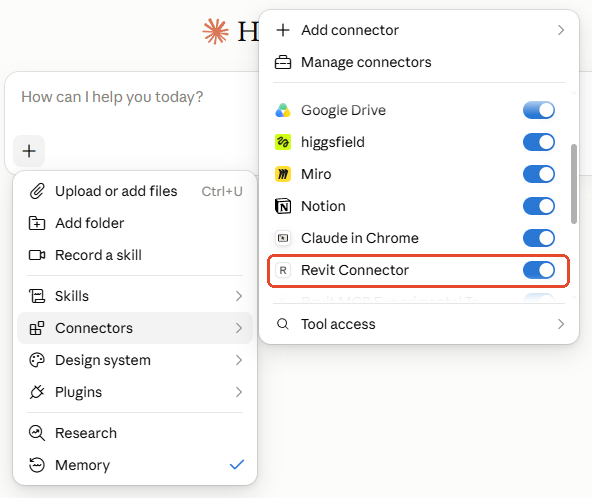
Then ask Claude this, with your model open in Revit.
Can you control my Revit model?
If the answer names your own model back, the connection is live. If it does not, the checks below find what is not running.
5. Add the skills
The skills are what put Claude to work: the views, the checks, the sheets. They come with Revit × Claude, 44 of them, three free to try, and the Install page you get with them has the zip and the one line to send Claude.
Not ready to buy? The free workflow gets your schedules into Excel with one prompt, so you can try it on your own model first.
Updating to a new version? Send the new zip with the same line from the Install page, then press Replace on the card Claude gives you.
If Claude cannot see Revit
- 1.In Revit, open pyRevit → Settings → Routes. You should see an orange band.
- 2.In Revit, open pyRevit → Extensions. The mcp row should say Enabled.
- 3.Open a new PowerShell window, type
uv --versionand press Enter. You should see a number. - 4.In Claude, click + → Connectors. Revit Connector should be there, switched on.
- 5.Quit Claude completely and open it again.
- 6.You need the full version of Revit on Windows. Revit LT and Macs will not work.
I hope this one helped, even a little. If it did, the skills and the handbook will help a lot more: the Revit jobs that come back every day, done with Claude, in the model that is already open. Only what I have run myself and found useful on real projects goes in.
David