Rhino to Illustrator
Claude looks at the Rhino model, suggests the drawings it can make, and builds the one you pick in Illustrator: the plan exported from Rhino, cleaned up, sorted into layers and coloured by room. All from the Claude desktop app.
Shown on the Pacific Continental Residence in Rhino 8
Revit × Claude is out: 44 Revit skills, three free to try. See the skills →
1. Connect RhinoRevit
The prompt runs through McNeel’s Rhino MCP, a free package that lets Claude read the model you have open and run scripts in Rhino. Keep Rhino open while Claude works.
▸How to set up the Rhino MCPopen
McNeel’s own guide is at mcneel.github.io/RhinoAI.
step 1Add the connector to Claude
- 1.Download connector.mcpb.
- 2.Claude Desktop →
Settings→Extensions→Advanced settings→ Install Extension, pick the file, then Install.
step 2Add the plug-in to Rhino 8
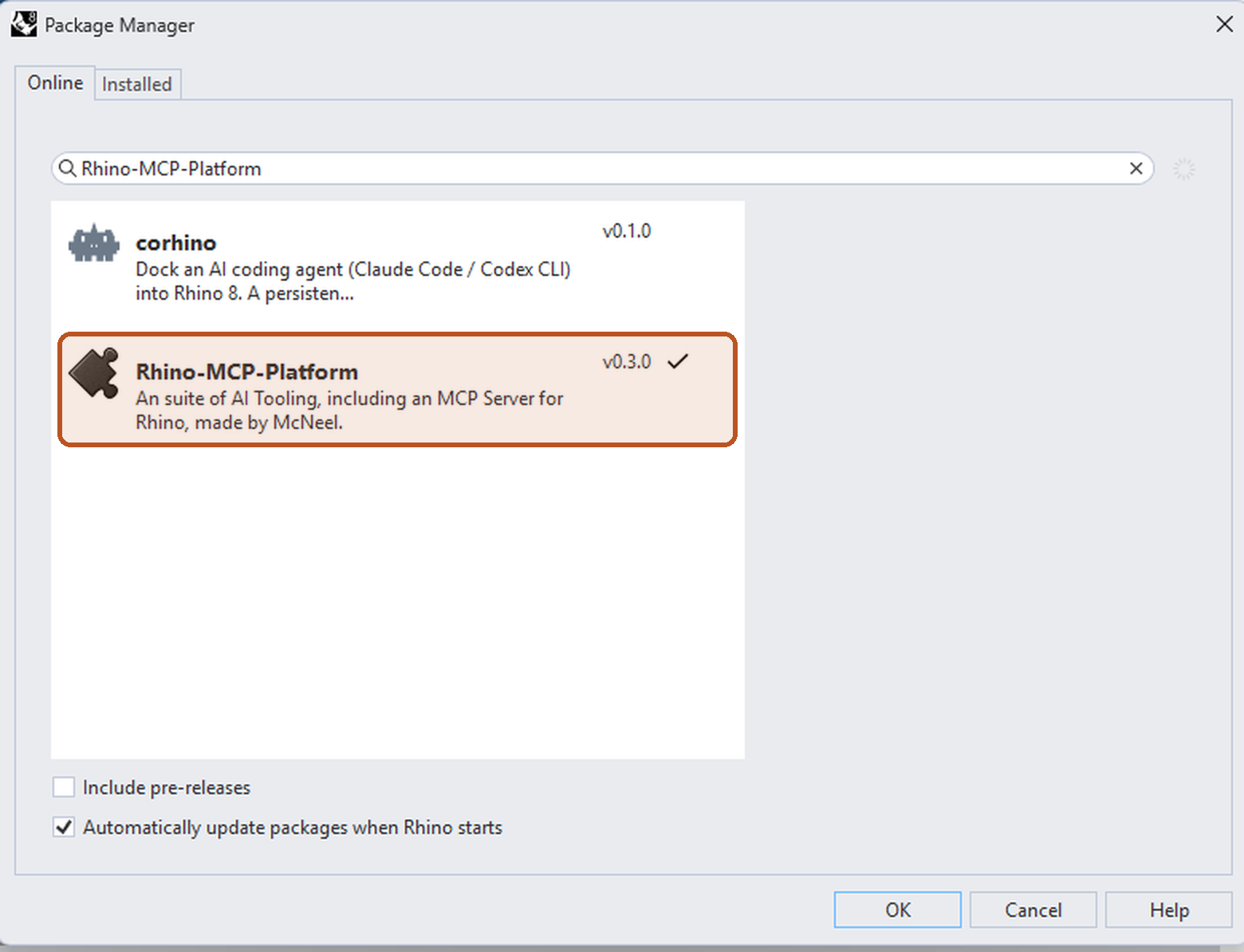
- 1.Type
PackageManagerin Rhino, search forRhino-MCP-Platformand install it. - 2.Restart Rhino and type
MCPStart.
The prompt runs through the Revit MCP server, a free add-in that lets Claude read the model you have open and make changes in it. Set it up once and it loads with Revit after that.
▸How to set up the Revit MCPopen
The full setup, with a video, is at archaiflow.com/setup.
step 1Install pyRevit
Install the latest pyRevit from pyrevitlabs.io.
step 2Add the extension, in Revit
It is in pyRevit’s own extension list, so there is nothing to download by hand.
- 1.Revit → pyRevit tab →
Extensions. Findrevit-mcp-pythonand install it. - 2.Same tab →
Settings→ Routes: turn the Routes Server on. - 3.Restart Revit and open a project.
step 3Install the Revit MCP
Paste this prompt to install the Revit MCP.
Connect the Revit MCP server to Claude Desktop on Windows.
The pyRevit extension is already installed at
%APPDATA%\pyRevit\Extensions\revit-mcp-python.extension

1. Install uv if it isn't already on PATH.
2. Add a "Revit Connector" entry to the mcpServers block of my
   claude_desktop_config.json that runs the main.py in that
   folder with uv. The repo README's "Connecting to Claude
   Desktop" section has the exact JSON shape:
   https://github.com/revit-mcp/revit-mcp-python
3. Tell me when it's done, and remind me to quit Claude Desktop
   completely and reopen it.
Quitting Claude Desktop completely and reopening it puts Revit Connector in the connectors list under the message box.
2. Connect Adobe
Illustrator and Photoshop come through Claude’s Adobe connector: in Claude, open the connectors list under the message box and turn on Adobe. Nothing to install.
To watch the drawings being built in your own Illustrator and Photoshop instead, see the extra at the end.
3. One prompt
Open the model in Rhino, then paste this into a new chat.
Use the Rhino model I have open, Illustrator and Photoshop.

1. Look at the model and suggest a few drawings it can make
   in Illustrator. Show them as cards and ask me which one.
2. Export the floor plan I have open in Rhino as a DWG, with
   each room's name, area and use. Save them to a folder in
   Documents.
3. Make the one I pick from the DWG: black walls, each room
   filled by its use with its name and area, a legend, a scale
   bar and a north arrow pointing to Rhino's true north.
4. Export the linework and the room names as transparent PNGs
   at 300 dpi, in the plan's own position.
5. Suggest a few ways to render it in Photoshop and ask me
   which one.
6. Build it in a new Photoshop document, one layer at a time:
   paper, floor textures by room, wall and furniture shadows,
   furniture, then the linework and names on top.

Never save the Rhino model.
Open the floor plan in Revit, then paste this into a new chat.
Use the Revit model I have open, Illustrator and Photoshop.

1. Look at the model and suggest a few drawings it can make
   in Illustrator. Show them as cards and ask me which one.
2. Export the floor plan I have open in Revit as a DWG, with
   each room's name, area and use. Save them to a folder in
   Documents.
3. Make the one I pick from the DWG: black walls, each room
   filled by its use with its name and area, a legend, a scale
   bar and a north arrow pointing to Revit's true north.
4. Export the linework and the room names as transparent PNGs
   at 300 dpi, in the plan's own position.
5. Suggest a few ways to render it in Photoshop and ask me
   which one.
6. Build it in a new Photoshop document, one layer at a time:
   paper, floor textures by room, wall and furniture shadows,
   furniture, then the linework and names on top.

Never save the Revit model.
Claude stops twice, at steps 1 and 5, so you can pick. The rest runs on its own.
4. What comes back
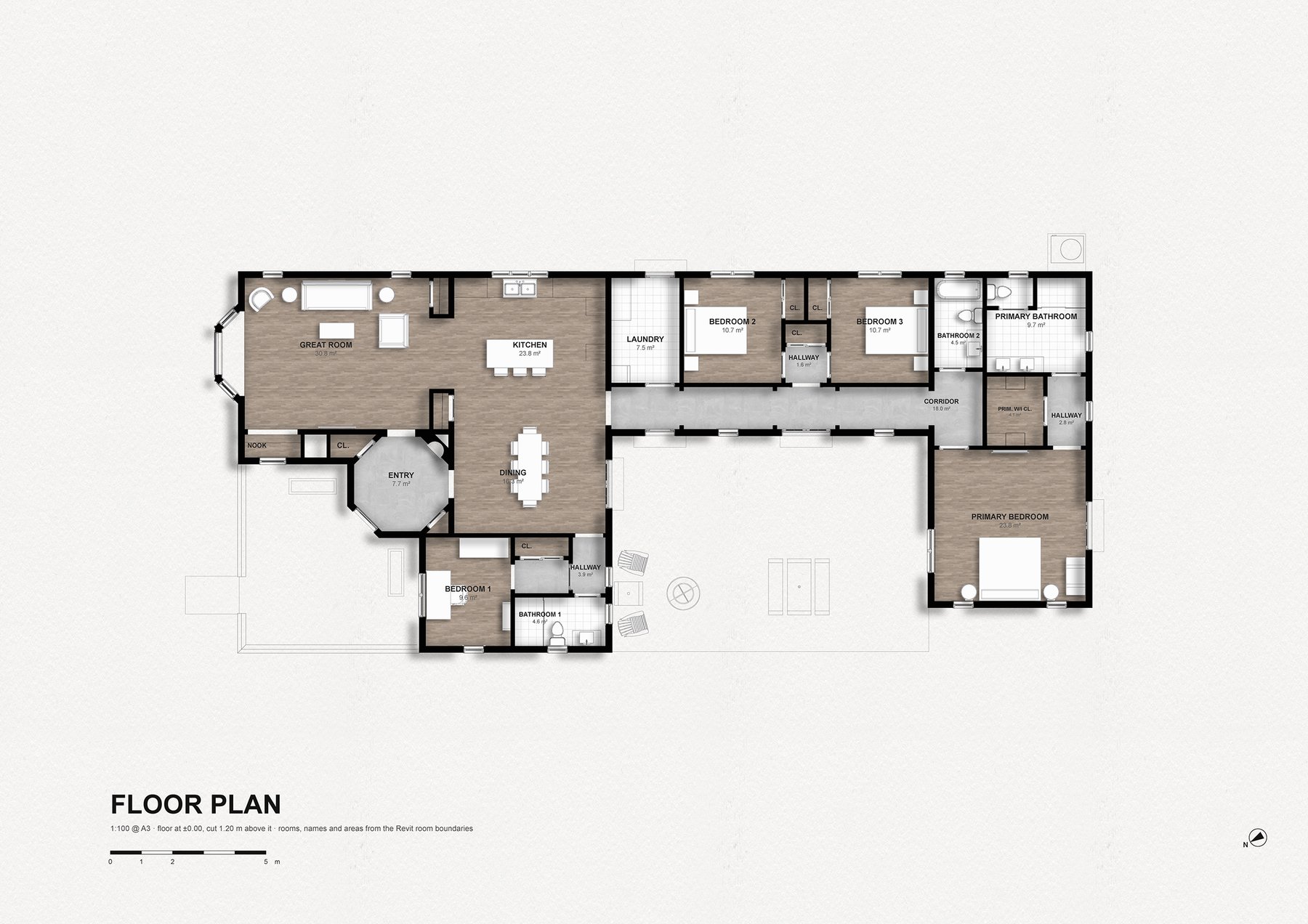
A plan exported from Rhino is messy. Everything in the model comes along: the terrain’s triangles, the edges of every tree, loose stubs, one flat line weight.
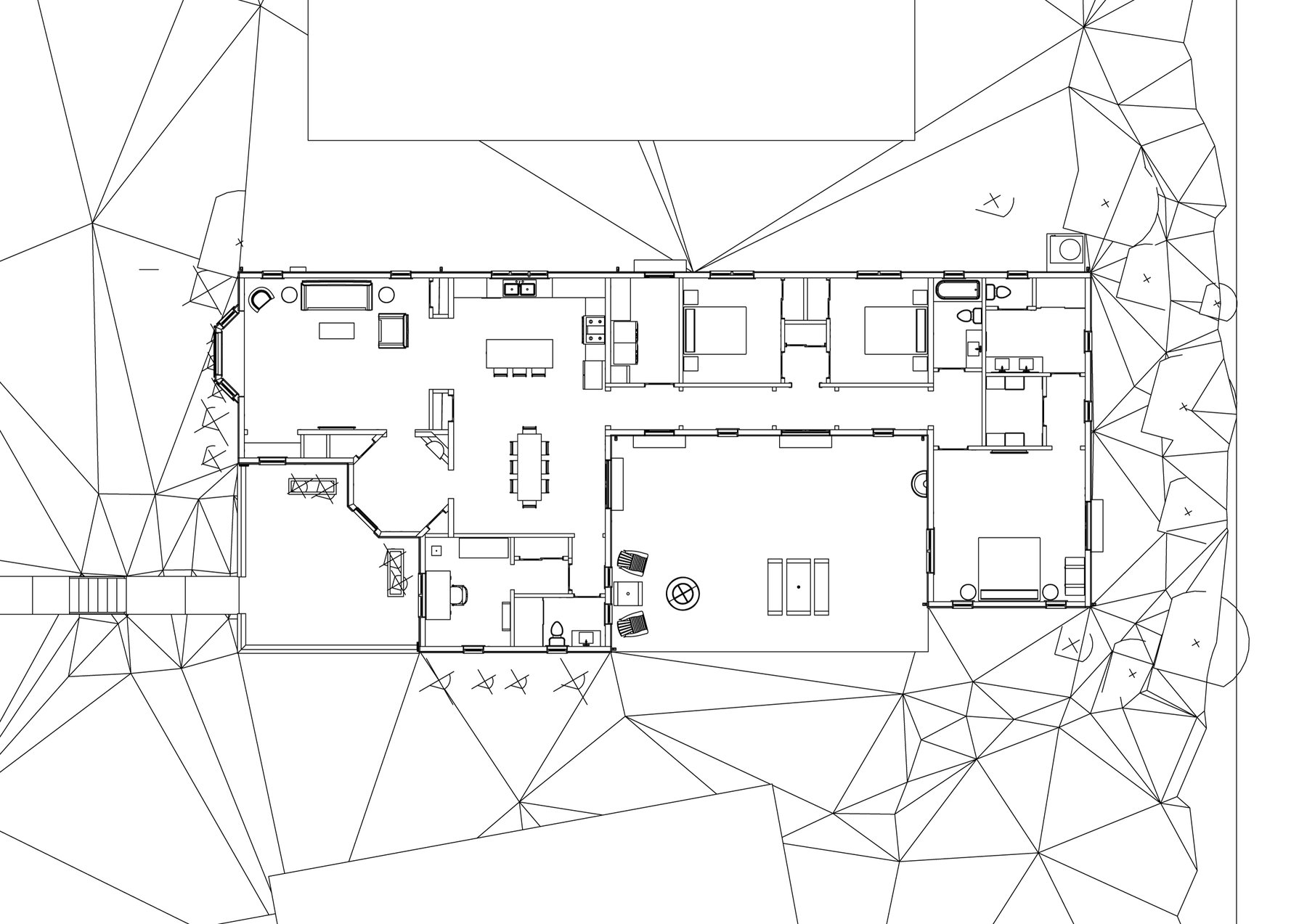
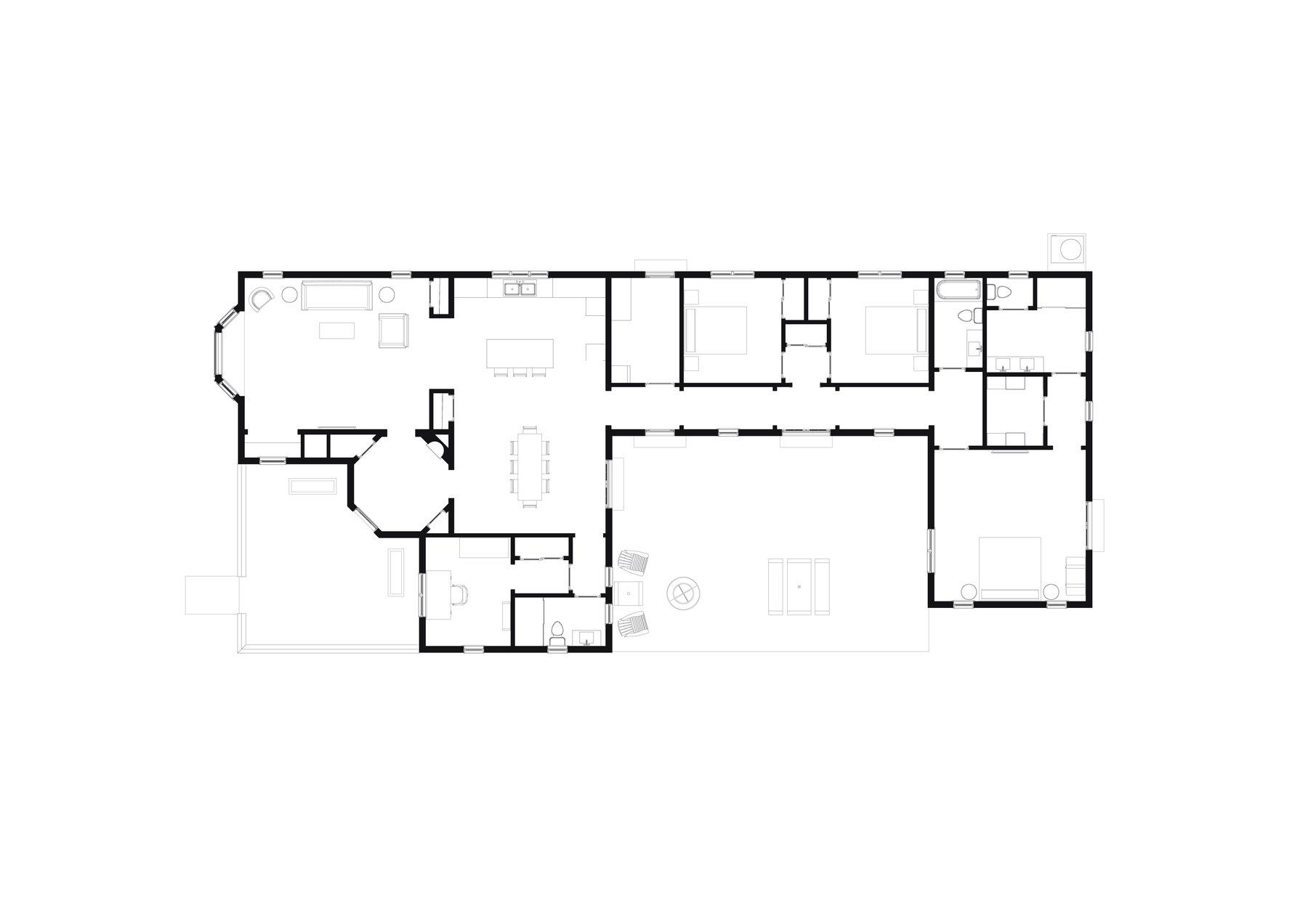
Illustrator cleans it up step by step: what is not floor plan goes, and the rest is sorted into a few named layers, each with its own line weight.
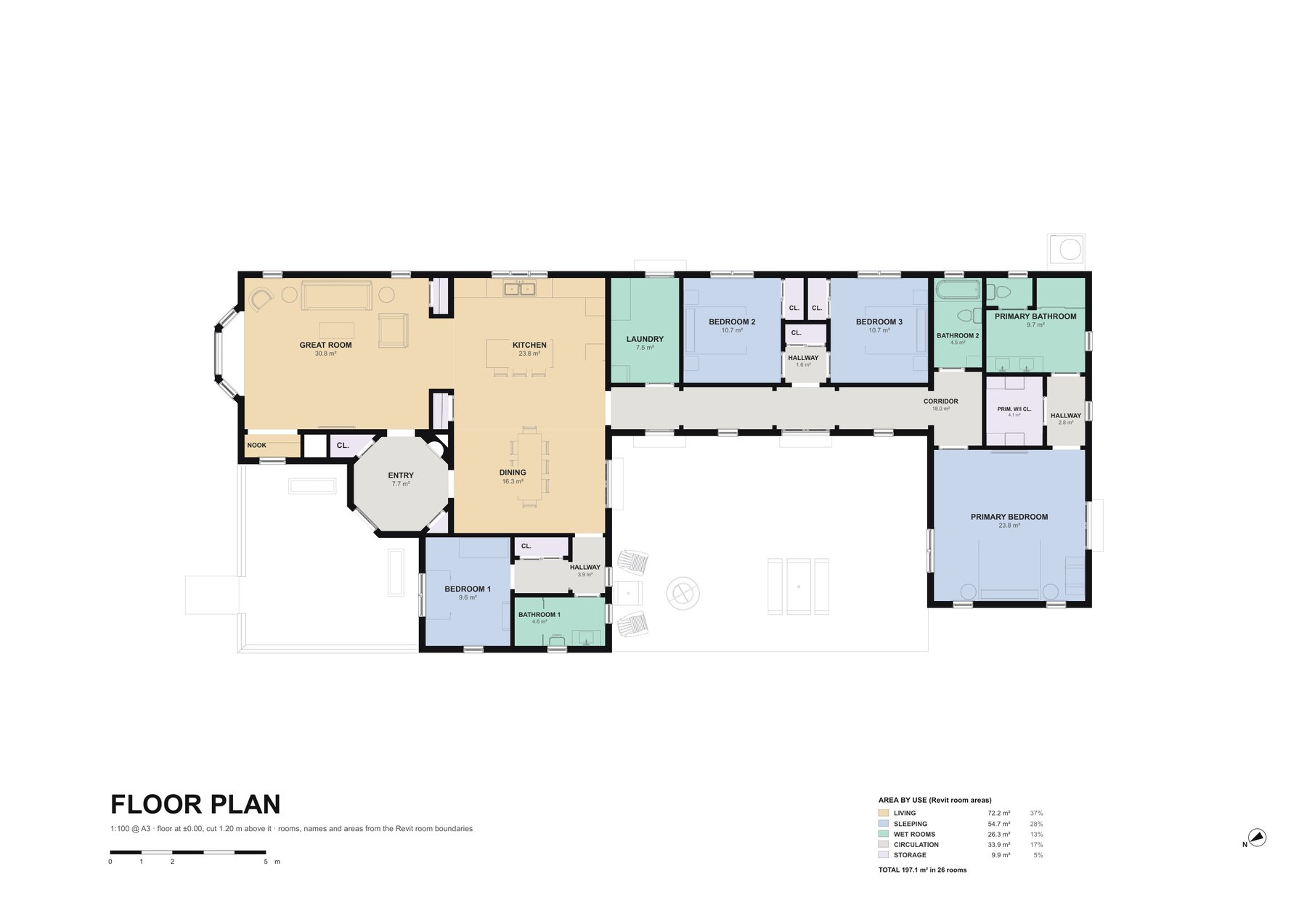
Then each room is filled by its use, named and measured.
5. And in Photoshop
The same plan, without the colour, goes to Photoshop as transparent layers for the part that needs pixels.
6. Revit or Rhino
Revit knows what a room is. Rhino does not. Revit can hand Claude every room’s name, area and use; in Rhino, Claude only finds rooms if someone drew them as named outlines or text.
For AI, and for automation most of all, that difference decides what can run on its own. Know what each tool is good at before you hand the work to AI.
7. Extra: live in your own Illustrator and Photoshop
You don’t need this for the prompt. It is for watching Claude build the drawings layer by layer in the Illustrator and Photoshop on your own computer. Both run through free MCP servers that need Node.js 20 or newer; keep the two apps open while Claude works.
▸How to set up the Illustrator and Photoshop MCPsopen
step 1Install Node.js
Install the LTS version from nodejs.org.
step 2Add both servers
Paste this prompt to add the two MCPs.
Connect two MCP servers to Claude Desktop on Windows.

1. Check that Node.js 20 or newer is on PATH.
2. Add two entries to the mcpServers block of my
   claude_desktop_config.json, each run with npx -y:
   - "illustrator": the npm package illustrator-mcp-server
     https://github.com/ie3jp/illustrator-mcp-server
   - "photoshop": the npm package @alisaitteke/photoshop-mcp
     https://github.com/alisaitteke/photoshop-mcp
3. Tell me when it's done, and remind me to quit Claude Desktop
   completely and reopen it.
After reopening, switch on the Rhino connectorRevit Connector, illustrator and photoshop in the connectors list under the message box.
I hope this one helped, even a little. If it did, the skills and the handbook will help a lot more: the Revit jobs that come back every day, done with Claude, in the model that is already open. Only what I have run myself and found useful on real projects goes in.
David