Revit to After Effects
Claude cuts your Revit model into pieces, a floor at a time, from one 3D view, and builds an After Effects animation of the building coming apart and back together. You can watch After Effects build it, one layer at a time.
Shown on the Snowdon Towers sample project in Revit 2027, with After Effects 2026
Revit × Claude is out: 44 Revit skills, three free to try. See the skills →
1. Connect Revit
The prompt runs through the Revit MCP server, a free add-in that lets Claude read the model you have open and make changes in it. Set it up once and it loads with Revit after that.
▸How to set up the Revit MCPopen
The full setup, with a video, is at archaiflow.com/setup. This page uses Claude Code, so the last step is different.
step 1Install pyRevit
Install the latest pyRevit from pyrevitlabs.io.
step 2Add the extension, in Revit
It is in pyRevit’s own extension list, so there is nothing to download by hand.
- 1.Revit → pyRevit tab →
Extensions. Findrevit-mcp-pythonand install it. - 2.Same tab →
Settings→ Routes: turn the Routes Server on. - 3.Restart Revit and open a project.
step 3Add the Revit MCP to Claude Code
Paste this prompt into Claude Code.
Connect the Revit MCP server to Claude Code on Windows.
The pyRevit extension is already installed at
%APPDATA%\pyRevit\Extensions\revit-mcp-python.extension

1. Install uv if it isn't already on PATH.
2. Add it with claude mcp add, as "revit", running the main.py
   in that folder with uv. Use the same command the repo README
   gives in its "Connecting to Claude Desktop" section:
   https://github.com/revit-mcp/revit-mcp-python
3. Tell me when it's done, and remind me to restart Claude Code.
2. Connect After Effects
After Effects has no MCP server. Claude writes a short script for each job and After Effects runs it, which is why this page uses Claude Code (the Code tab in the Claude desktop app, or the terminal) rather than a chat.
▸How to get After Effects readyopen
step 1Let scripts save files
In After Effects, open Edit → Preferences → Scripting & Expressions and turn on Allow Scripts to Write Files and Access Network. Without it, a script that writes a file stops on a warning and waits for a click.
step 2Nothing to paste yet
The prompt in section 3 tells Claude how to send After Effects a script and how to render the video, with the two programs that come with it. Keep Revit open.
3. One prompt
Open the model in Revit, then paste this into Claude Code.
Use the Revit model I have open and After Effects.

Read the model's levels, rooms, phases and 3D views. Tell
me what you found, with a count for each.

Then ask me these one at a time, waiting each time:
1. which 3D view to start from, or a new isometric one
2. how to cut the building into pieces, 2-3 options from
   what you found
3. how the pieces should move, 2-3 options on one board of
   numbered cards with made-up example pictures, marking
   the one you would pick
4. render it straight to a video, or build it in After
   Effects on screen, one layer at a time, so I can watch

Work on a copy of the 3D view, so the model's own views
stay as they are. Export every piece from that one view
with the same crop, so they line up. Then build the After
Effects project: one layer per piece, labels named from
the rooms on each level, and the moves I picked. Save the
project and render an MP4 next to it.

While you work:
- Revit has no see-through export. Export each piece
  twice, on a white and on a black background, and work
  out the see-through part from the difference.
- Cut floors with a section box per level, so a wall that
  runs through several floors is cut with them.
- A new 3D view starts with shadows on. Turn them off.
- Send After Effects your scripts with AfterFX.exe -r and
  render with aerender, both in its Support Files folder.

Never save the Revit model. Tell me where the files are,
and delete the copy of the view when I say I'm done.
Claude asks one question at a time and waits for each answer. After the last one, the rest runs on its own.
The four lines under “While you work” are what took longest to find out. With them, the pieces come out clean and line up the first time.
4. What comes back
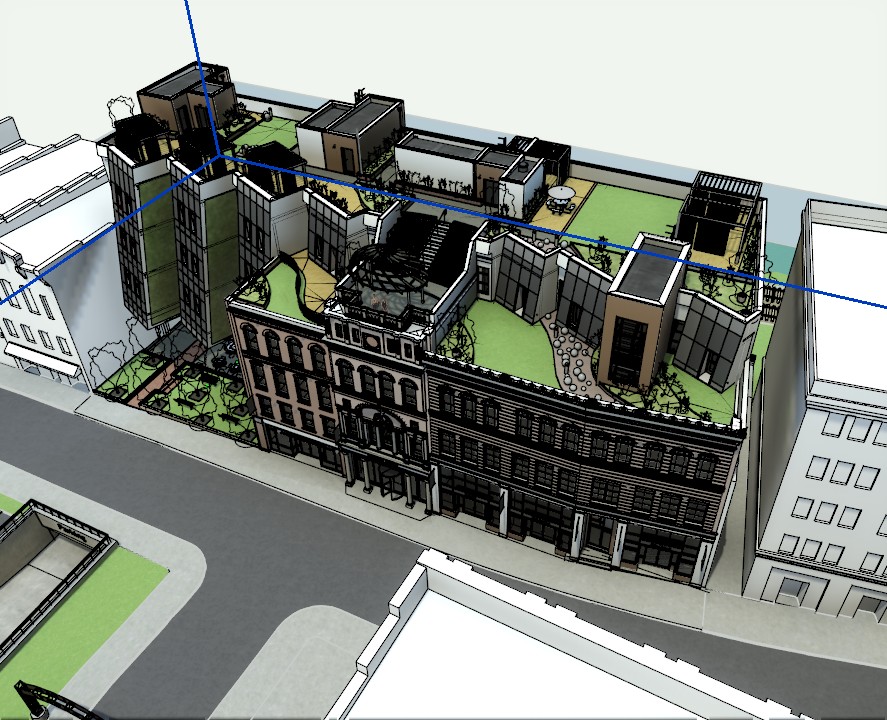
First, what is in the model. On Snowdon Towers that is 67 rooms on nine levels, and an old brick facade kept in a phase of its own.
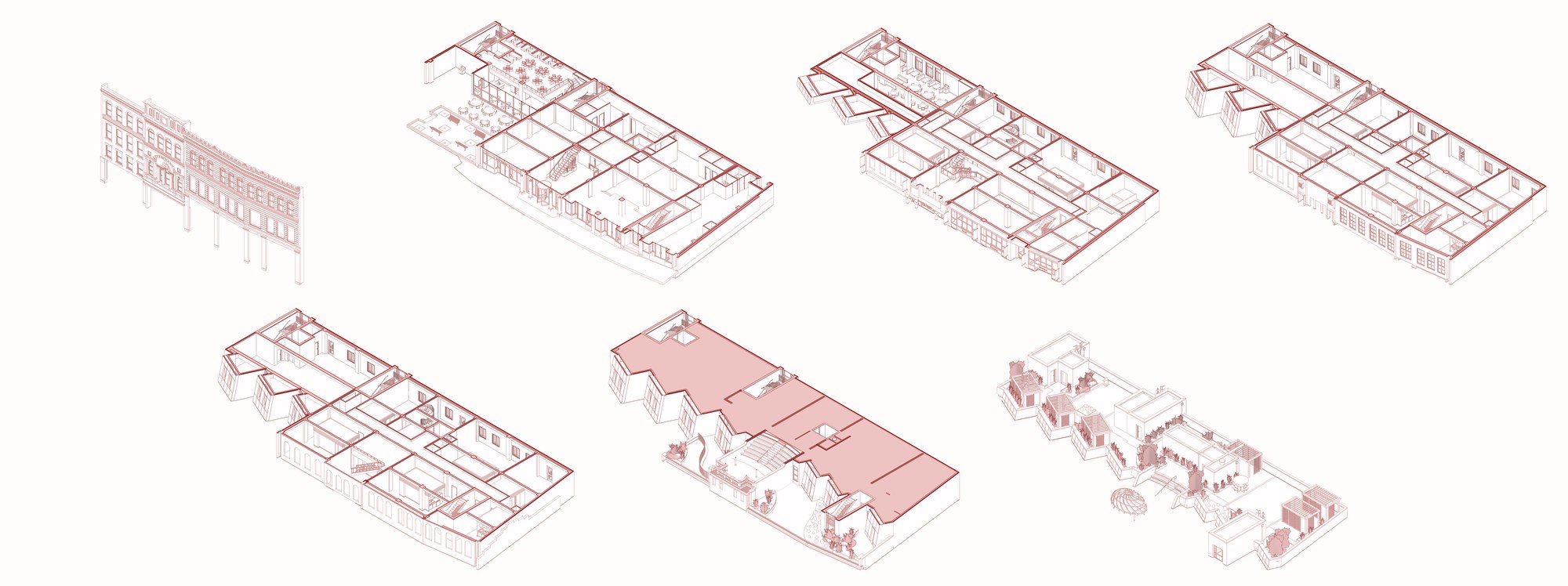
Then the pieces. Snowdon came apart as seven: the old facade as one piece, all 289 of its elements together, and the building in six slices, the ground floor, levels 2 to 5 and the roof, each cut with its own section box.
Then the animation. The pieces drop in and settle, the roof lifts off, a section line sweeps across, the old facade slides out along the street, and the floors rise one by one with their labels. Then it all goes back together, and trees and clouds come in. The building is the model; the dashed guides, labels, trees and clouds are drawn by Claude’s script. The moves follow Toffu Co’s exploded building tutorial.
Pick the on-screen build instead, and After Effects opens in front of you. Each layer arrives in its place, the timeline fills up below, and the preview plays at the end.
I hope this one helped, even a little. If it did, the skills and the handbook will help a lot more: the Revit jobs that come back every day, done with Claude, in the model that is already open. Only what I have run myself and found useful on real projects goes in.
David